Monday, September 9, 2013
Windows 8 surpasses OS X, in spite of "ubiquitousness" of latter
In a note full of charts and figures, ArsTechnica informed last week that Windows 8 is more widely used than OS X, while Internet Explorer 10 is on the rise. The worldwide operating system net market share indicates that Windows 7 holds a slice of 47.3%, whereas Windows 8 has a 7.43% and Windows XP 33.66%, with the rest of the pie shared between Vista, OS X and Linux, according to ArsTechnica. What I find surprising is the steady adoption of Windows 8 in spite of the ubiquitousness of Apple computers. Yes, they are visible everywhere but mostly in cafes and out in the wild, a striking contrast with what you see when you go into most corporate offices where Windows still rules. There is no denial, however, that Apple computers, iPhones and iPads are very popular now but that applies mostly in the consumer world. I particularly like all of these gadgets, but Microsoft Windows (both 7 and 8) are my favorite operating system.

Thursday, July 4, 2013
Windows 8.1 consolidates, reaffirms Microsoft brave new world
 |
| Windows 8.1 Preview showing four windows at once in the "Modern" UI. |
Sunday, June 23, 2013
There are lots of people who also love Windows 8
I just happened to run into an article in the Huffington Post with a headline exactly as the name of this blog: I love Windows 8, though the author adds immediately "and No, My Account Has Not Been Hacked." The points made are basically that Windows 8 is more than meets the eye and in the process "Microsoft has taken the mantle of innovation and good design away from Apple." Regarding the widely publicized "criticism" of Windows 8 I just have to say two things: those who criticize this new paradigmatic shift are usually Apple or Android users and/or "journalists" who don't exactly know what they are talking about, since they don't use it, and, most of those rants are bordering in childish tantrums, no substance... Talk about "impartiality in journalism..."
End of retail customer service as the weakest link for Microsoft products?
 |
| Not an unusual view in some Best Buy stores: empty displays or misplaced merchandise, not to mention frozen PCs. This is my experience. |
Monday, May 27, 2013
Will these new bikes change the character of New York?

Why I did not buy Adobe Photoshop Elements 11, etc.

Saturday, May 18, 2013
Virtual machines: VMware and Hyper-V living in the same host computer
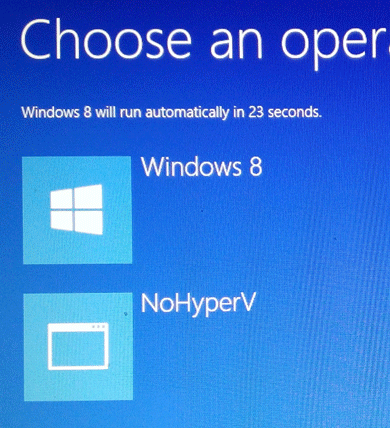 Among the powerful and useful features that come with Windows 8 Pro is the Hyper-V technology, specifically Client Hyper-V (as opposed to Server Hyper-V, present in Windows Server 2012). This technology is Microsoft's response to the established and solid VMware virtualization tools. However, it is not possible to run both Hyper-V and VMware in the same machine at the same time and you will learn that as soon as you try to run one or the other system. It's an either/or proposition, but there is a solution: you can create two different ways of booting up Windows 8 as if there were two different operating systems. The main reason for this is that Hyper-V is a "layer" (type 1 hypervisor) loaded on top of the hardware layer before the operating system is loaded, whereas VMware is a virtualization engine (type 2 hypervisor) that is sitting on top of the operating system. So, the trick is to create two choices (as shown to the right) when starting your computer. For this you need to add an entry to the Boot Configuration Data (BCD) store which contains boot configuration parameters and controls how the operating system is started, using the "bcdedit" command. These parameters were previously in the Boot.ini file (in BIOS-based operating systems). Follow these instructions, as I successfully did, to configure Windows 8 to boot either Hyper-V or VMware. Please, make sure you know what you are doing. If all goes well you will see a similar start-up screen as shown here. To use VMware virtual machines start with "NoHyperV".
Subscribe to:
Posts (Atom)